

Open Content & Devices to delete forever, or remove download on your Kindle.
If you have asked yourself how can i delete a book from kindle, you are not alone. I help readers clean up their libraries every week.
Here, I show clear steps that work. You will learn when to remove, when to delete, and what to avoid. Follow along to master how can i delete a book from kindle with ease.

Remove vs delete: what each action really does
Here is the simple truth. Remove download takes a book off your device but keeps it in your Amazon library. Delete permanently erases it from your account. You lose access unless you buy it again. Many readers confuse these two actions.
If you came here thinking how can i delete a book from kindle, start with this check. Do you only need to free space? Then remove download is enough. Do you want it gone from your account? Then use Amazon’s Content & Devices to delete.
I learned this the hard way while clearing space before a long trip. I deleted a paid title by mistake. I had to buy it again. Do not repeat that mistake.

How to delete a book from a Kindle e‑reader?
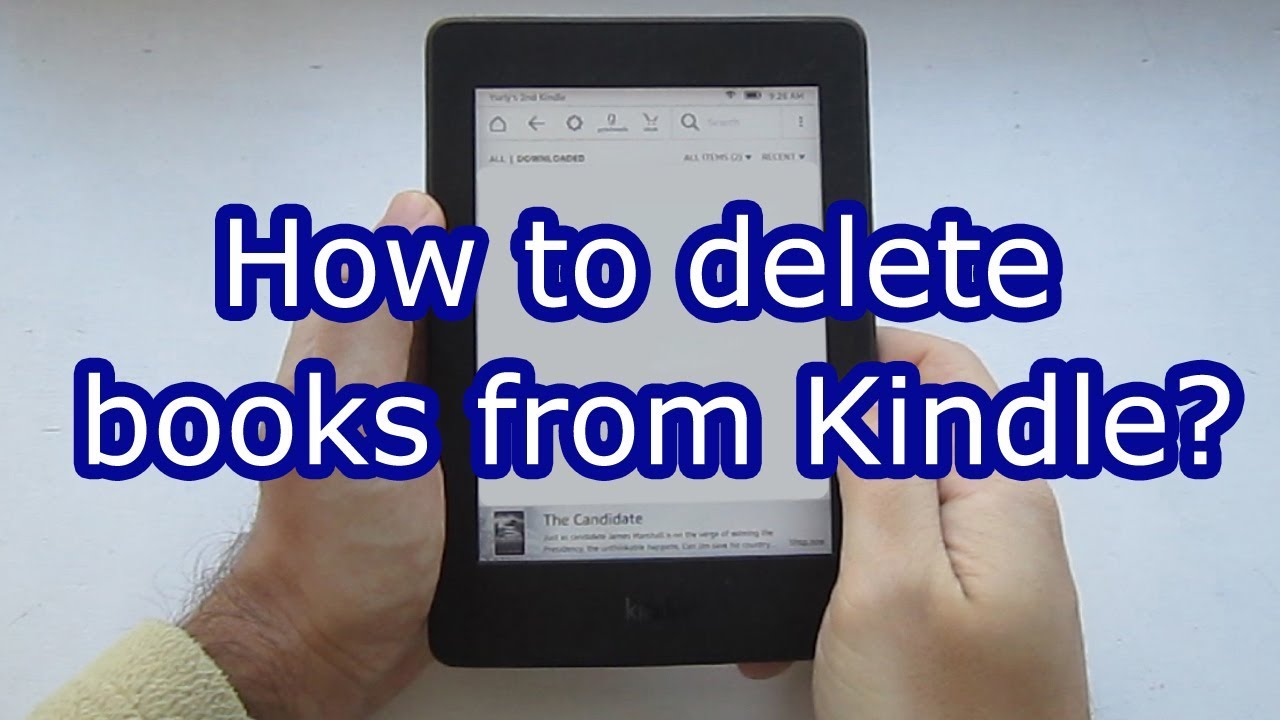
If you want a quick space cleanup, do this on the device. This works on Kindle, Kindle Paperwhite, and Kindle Oasis. It is the fastest way if your goal is not to erase the title from your account.
Steps to remove a download on your Kindle:
- Go to Library.
- Find the book.
- Press and hold the cover.
- Tap Remove Download.
- Confirm.
If your goal is permanent deletion, the device will not do it for most purchased books. Use the Amazon website instead. That is the reliable answer to how can i delete a book from kindle in a final way.
Pro tip from my workflow: after a reading sprint, I open Storage Management. Go to Settings, Device Options, Advanced Options, Storage Management. I bulk remove old reads. It frees space fast without risk.

How to delete a book from the Kindle app (iPhone, iPad, Android)
You can clear space in the Kindle app. But the app often cannot delete a purchased title from your account. It will remove the download only. That still helps a lot.
iPhone or iPad:
- Open Kindle and tap Library.
- Press and hold the book.
- Tap Remove Download.
- To delete forever, open Amazon Content & Devices in a browser.
Android:
- Open Kindle and tap Library.
- Press and hold the title.
- Tap Remove Download.
- If you see Delete Permanently for a personal document, you can use it. For purchased books, use the website.
If you ask how can i delete a book from kindle using only the app, know the limit. The safe path for permanent removal is the website.
How to permanently delete a Kindle book on Amazon’s website?
This is the final step if you want the book gone from your library. It is the key step in how can i delete a book from kindle for good. After this, you must buy the title again to read it in the future.
Do this on a phone or computer:
- Go to amazon.com and sign in.
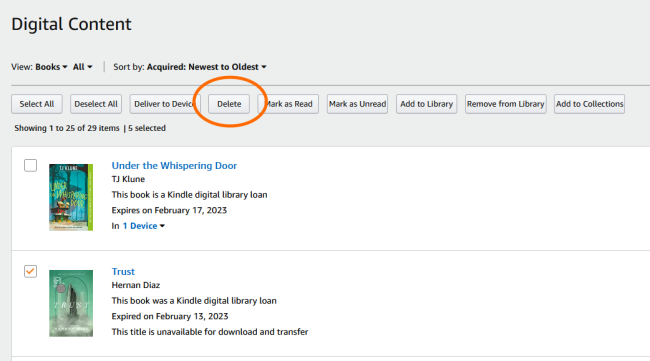
- Open Account, then click Content & Devices.
- In the Content tab, find the book. Use search if needed.
- Check the box next to the title.
- Click Delete.
- Confirm Yes, delete permanently.
If the book is part of Kindle Unlimited or Prime Reading, you will see Return instead of Delete. Use Return to end the loan. That returns your slot and removes the title from your devices.
Return Kindle Unlimited and Prime Reading books
Loans work differently from purchases. The right action is Return, not Delete. This is a common source of mix‑ups when people ask how can i delete a book from kindle.
To return from the website:
- Go to Content & Devices.
- Filter by Kindle Unlimited or Prime Reading.
- Click Return next to the title.
To return from a Kindle or app:
- Go to Library.
- Press and hold the book.
- Tap Return Book.
Return frees a KU slot at once. It also cleans your Library view. This is my go‑to step when my KU queue gets full.

Delete samples and personal documents
Samples are easy to remove. Personal documents sent via Send to Kindle need one extra step if you want a clean account. If your aim is how can i delete a book from kindle without clutter, handle these too.
Samples on device or app:
- Press and hold the sample.
- Tap Remove Download. It is gone from Library for many users.
Personal documents:
- Open Content & Devices.
- Filter by Docs or Personal Documents.
- Select the items.
- Click Delete and confirm.
Tip: If a document reappears, check if it is still in your email Sent to Kindle list. Remove the source file or stop auto‑send rules.

Restore, re-download, and archive items
If you removed a download by mistake, you can get it back in seconds. This is the other side of how can i delete a book from kindle. Your library keeps purchases unless you delete them.
To restore:
- Open Library on your Kindle or app.
- Switch to the All tab or Cloud view.
- Tap the download icon on the title.
On the website, you can also deliver a title:
- In Content & Devices, select the book.
- Click Deliver or Download.
- Choose your device.
I often re-download finished books to check quotes. It takes a tap and a brief sync.

Troubleshooting: when a book will not delete
Sometimes a title seems stuck. Do these checks before you ask again how can i delete a book from kindle.
Try these fixes:
- Sync your device. Tap the three dots. Tap Sync.
- Restart the device or app. A fresh start clears cache issues.
- Update the Kindle app or device software.
- Check if the title is shared via Family Library. Stop sharing first.
- Turn off Parental Controls or remove the title from a kid profile.
- On the website, clear filters in Content & Devices. Then try delete again.
If you still cannot delete, it may be a subscription loan. Look for Return instead of Delete. That usually clears it.
Best practices for a tidy Kindle library
A clean library saves time and storage. I manage mine once a month. This plan keeps things easy and supports the goal behind how can i delete a book from kindle.
Simple habits:
- Use Collections. File by genre, work, school, or trip.
- After you finish a book, decide now: keep, archive, or delete.
- Use Storage Management to remove old reads fast.
- Return Kindle Unlimited books the day you finish.
- Delete samples you no longer need.
Set a calendar reminder for a quick 10‑minute clean. Small steps beat a yearly mess.
Frequently Asked Questions of how can i delete a book from kindle
Can I delete a purchased book forever from my Kindle?
Yes, but not from the device in most cases. Use Amazon’s Content & Devices on the website to delete permanently.
What is the difference between Remove Download and Delete?
Remove Download clears the file from your device but keeps it in your library. Delete removes the title from your account forever.
How can i delete a book from kindle on my iPhone?
Open the Kindle app, press and hold the title, and tap Remove Download. For permanent deletion, use the Amazon website’s Content & Devices page.
How do I delete Kindle Unlimited books?
You do not delete them. You return them. Use Return Book in the app or Content & Devices on the website.
If I delete a book, can I get it back without paying?
If you only removed the download, yes, you can re-download it. If you deleted it permanently, you must buy it again.
Why does the Delete option not show up?
It may be a loan, sample, or app limit. Try Return for loans or use the website for permanent deletion.
Does deleting a book remove my notes and highlights?
Remove Download keeps notes in the cloud. Permanent deletion can remove access to your notes with the book.
Conclusion
You now know every path to a clean Kindle library. Use Remove Download to save space. Use Content & Devices to delete for good. Return loans when you finish them. These moves answer how can i delete a book from kindle in clear steps.
Take five minutes today to tidy your Library and free space. Then set a monthly reminder to keep it neat. Want more guides like this? Subscribe for updates, or leave a comment with your next Kindle question.