

Expect $2,000–$10,000 to self-publish; traditional deals shift most costs to publishers.
You want clear numbers and a plan that fits your goals. That is why this guide breaks down how much does it cost to publish a book with real budgets, honest ranges, and expert tips.
I have helped first-time authors and pros set smart budgets and avoid costly mistakes. If you are asking how much does it cost to publish a book, you will get a complete, practical answer here that you can use today.
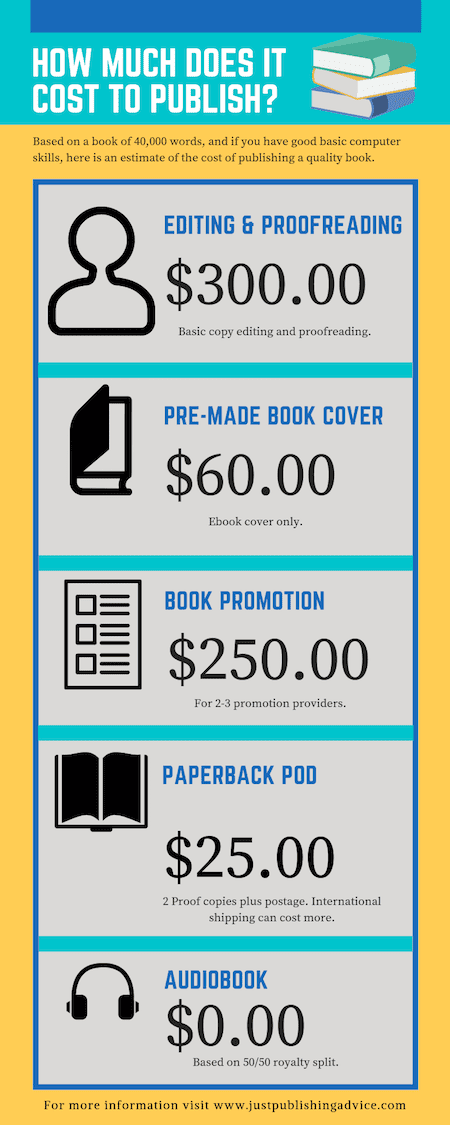
Costs at a glance
The short answer is that your budget depends on the path, length, and goals. This guide shows how much does it cost to publish a book across common cases. Use these ranges as a starting point, then adjust by scope and quality.
- Ebook only, light edit, simple cover: $500–$2,000
- Novel, 70,000 words, pro edit and custom cover: $3,000–$8,000
- Nonfiction with charts or photos: $4,000–$12,000
- Children’s picture book with custom art: $3,000–$15,000
- Traditional deal: $0 for production, $0–$2,000 personal marketing
When clients ask me how much does it cost to publish a book, I show them these bands and match each line item to their goals. Your best budget maps to quality, timeline, and sales plan. Aim for value, not the lowest bid.
Publishing paths and who pays
Your answer to how much does it cost to publish a book depends first on your path. Each path shifts who pays, who controls rights, and how fast you ship.
- Traditional publishing. The publisher pays for editing, design, and printing. You may still invest in your site, ads, and events. Expect longer timelines and strong editorial input.
- Self-publishing. You pay for editing, design, setup, and launch. You keep control and higher royalties. Your choices decide quality and speed.
- Hybrid publishing. You share costs with a press that offers project support. Review contracts with care. Avoid vanity presses that sell packages with weak results.
I have seen authors spend less yet lose time fixing errors. I have also seen smart spend in edits and cover design boost sales. This is why how much does it cost to publish a book is also about what you want to achieve.

Editing costs explained
Editing is the most important spend. It can make or break reader trust. It also drives how much does it cost to publish a book in most cases.
- Developmental edit. Big-picture work on structure, gaps, and flow. Typical range is $0.03–$0.09 per word.
- Line edit. Style, clarity, rhythm, and tone. Typical range is $0.02–$0.06 per word.
- Copyedit. Grammar, usage, and consistency. Typical range is $0.015–$0.04 per word.
- Proofread. Final check before print or upload. Typical range is $0.01–$0.02 per word.
For a 70,000-word novel, a pro edit stack can run $2,500–$6,000. If your budget is tight, at least get a copyedit and proof.
I have seen authors skip this and pay more later to fix reviews and returns. When you weigh how much does it cost to publish a book, protect your edit line first.
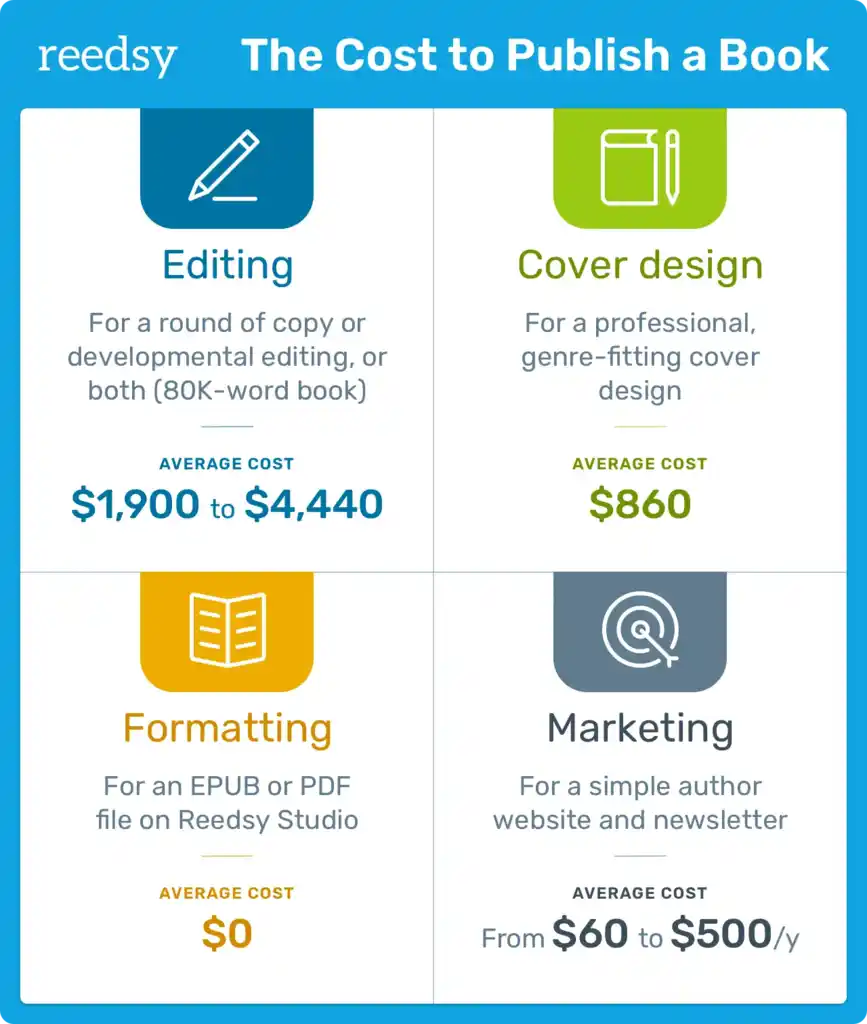
Design and formatting
Great design helps your book get picked and read. It also shapes how much does it cost to publish a book for both print and ebook.
- Cover design. Custom cover, $300–$1,500. Top-tier concept or series brand, $1,500–$3,000.
- Interior layout. Print layout for fiction, $200–$600. Complex nonfiction with images or tables, $600–$2,000.
- Ebook formatting. Reflowable EPUB and MOBI, $100–$400. Complex layouts may cost more.
- Illustrations. Spot art, $50–$300 each. Full color plates or picture book spreads, $150–$800 each.
- ISBN and barcode. One ISBN can be free via some platforms, but using your own improves control. A block can cost a few hundred dollars.
Readers judge a book by its cover in three seconds. This is where a smart spend can raise sales and ads ROI. I often advise authors to test two cover comps with small ad spend before launch.
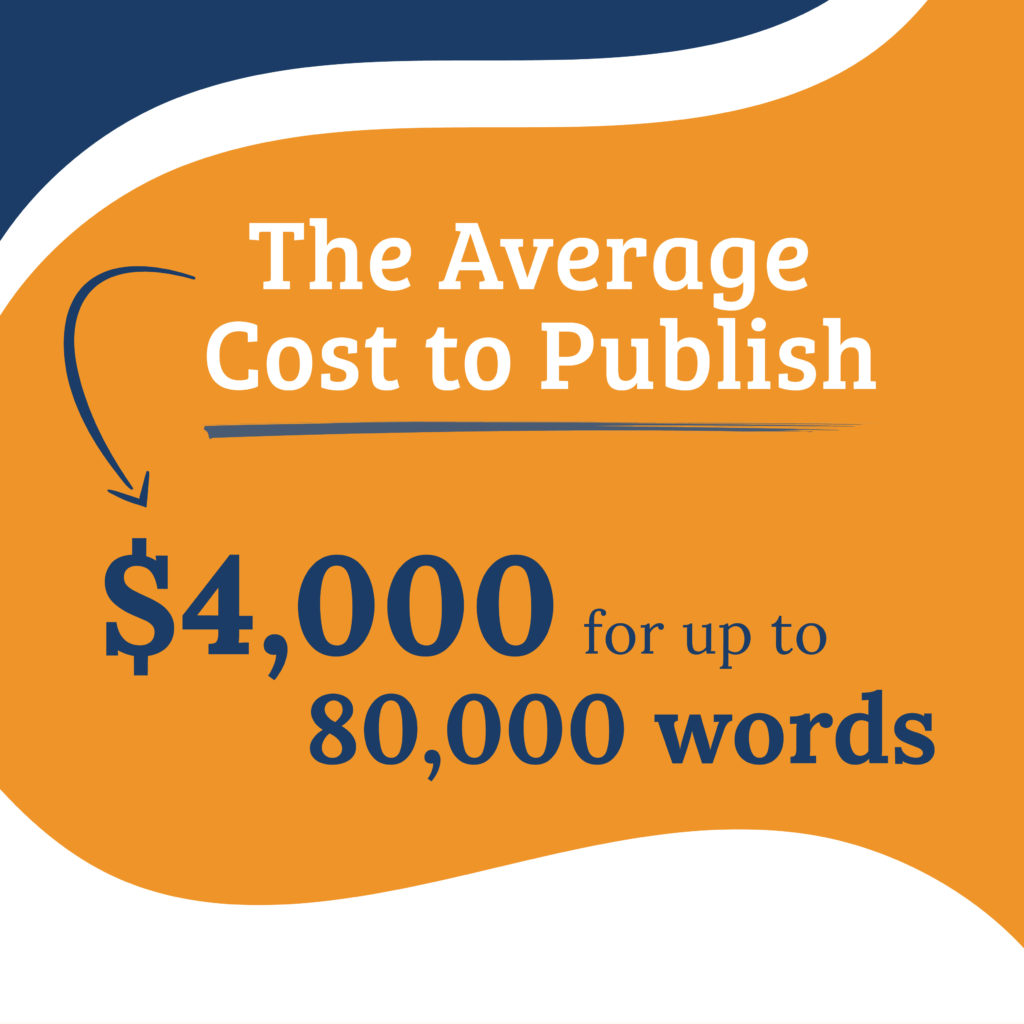
Printing, distribution, and formats
Your print plan changes your unit costs and reach. It also affects how much does it cost to publish a book over time.
- Print on demand. No large inventory. Each copy costs more to make but you pay per order only. A 300-page trade paperback can cost about $4–$6 per copy to print.
- Ingram and KDP setup. KDP has no setup fee. IngramSpark may have setup and revision fees. Watch for promo waivers.
- Offset print runs. Lower unit cost for large orders. Expect $2–$4 per copy for 1,000+ copies, plus freight and storage.
- Distribution. KDP covers Amazon. Ingram gives wide reach to bookstores and libraries. Set terms that stores accept.
Do a simple margin check before you lock price. Printing and fees stack up fast. A small change in page count can save a lot across sales.
Marketing, PR, and launch
Marketing shapes sales more than any other step. It also decides how much does it cost to publish a book after launch.
- Advance copies. Digital ARCs or print proofs, $50–$300.
- Email and website. Domain, hosting, and tools, $100–$300 per year. Landing page setup, $100–$500.
- Ads. Amazon and Meta ads, $300–$2,000 for a test cycle. Scale only when your CPC and conversion work.
- Publicity. Media outreach, $500–$5,000. Be careful with big promises.
- Giveaways and promos. Listing services, $50–$400 per push.
I ask authors to set a 90-day launch plan with weekly tests. One client raised ROI when we moved spend from broad keywords to comp-author ads. Track data and shift fast.

Hidden costs, and where to save or spend
Small fees add up. Plan for them so they do not blow your budget. This also helps you pin down how much does it cost to publish a book with no shocks.
- Revisions. Extra edit rounds can add 10–30 percent to quotes.
- Extra formats. Hardcovers, large print, and audiobooks each add cost.
- Legal. Permissions, quotes, and image rights can add fees.
- Tools. Proof copies, proofing apps, and file validators save time.
Save on tasks that are simple and safe. Spend on pro edit and cover. That split protects quality and your brand.

Sample budgets and ROI
Use these example budgets to see how much does it cost to publish a book in practice. Adjust for length, art needs, and goals.
Lean starter, ebook first
- Copyedit and proof: $900
- Simple cover: $300
- Ebook format: $150
- Light ads and promos: $300
Total: $1,650
Standard indie, print and ebook
- Dev edit + copyedit + proof: $3,500
- Custom cover: $800
- Interior layout: $400
- Print setup and proofs: $150
- Ads, email, and promos: $1,000
Total: $5,850
Premium launch, series brand
- Full edit stack: $5,000
- Top-tier cover and series brand: $2,000
- Complex interior or images: $1,200
- ARC, website, and PR: $2,500
- Ads test and scale: $2,500
Total: $13,200
To judge ROI, track cost per sale, read-through in a series, and ads profit. Price, format mix, and read-through can beat a higher up-front spend.
Timeline and cost control checklist
Time is money in publishing. A simple plan helps you control how much does it cost to publish a book and avoid rush fees.
Suggested timeline
- Month 1. Final draft, sample edit, hire team.
- Month 2–3. Developmental edit, revise, line edit.
- Month 4. Copyedit, cover design, layout.
- Month 5. Proofread, upload, order proofs.
- Month 6. Launch, ads tests, reviews push.
Cost control tips
- Lock specs early. Page count and trim size affect everything.
- Get fixed bids with scope and rounds in writing.
- Test covers and blurbs before you scale ads.
- Keep a 10–15 percent buffer for surprises.
Funding and tax basics
Your book is a small business. Treat it with care and you can lower how much does it cost to publish a book after taxes.
- Funding options. Save cash flow with staged work, preorder cash, or crowdfunding. Grants exist for some genres and regions.
- Tax basics. Track all costs, keep receipts, and log mileage. Many costs may be tax-deductible as business expenses. Ask a tax pro for advice in your area.
- Rights and assets. Own your ISBNs and source files. They add long-term value.
I have seen authors win back spend by smart tax planning and by using preorder funds to cover print runs.
Frequently Asked Questions of how much does it cost to publish a book
What is the average cost to self-publish a book?
Most authors spend between $2,000 and $8,000 for a solid release. Complex nonfiction or art-heavy books can run higher.
Is traditional publishing really free for authors?
You do not pay for editing, design, or printing under a standard deal. You may still invest in your own marketing to boost reach.
Can I publish a book with no money?
Yes, but results may suffer without pro editing and design. Use free tools and small tests, then reinvest early sales.
What is the biggest cost when publishing a book?
Editing is often the largest line item, followed by cover design. These two areas impact sales and reviews the most.
How much should I spend on marketing?
A good test budget is $300–$1,000 for the first month. Scale only when your ads show stable profit or clear growth.
Do I need my own ISBN?
You can use a free platform ISBN, but you may lose some control. Owning ISBNs helps with distribution and brand identity.
How long does it take to publish once the draft is done?
Plan for three to six months with full editing and design. Faster is possible, but quality can slip under rush.
Conclusion
You now have a clear view of how much does it cost to publish a book, what drives each line, and where to invest for the best return. Editing and design lead the way, while a smart launch plan turns quality into sales. Set your path, pick your team, and match spend to goals.
Take the next step today. Map your budget, get two to three quotes, and book your edit slot. If this guide helped, share it with a writer friend, subscribe for more deep dives, or ask a question in the comments.