

Yes, you can share Audible books via Amazon Household’s Family Library, with account and region limits.
If you have asked can you share audible books, this guide is for you. I work with digital content, rights, and user experience daily.
Here, I break down how sharing works, what to avoid, and the best ways to get it right. By the end, you will know exactly how can you share audible books safely and within the rules.
How Audible sharing really works?
The short answer is yes, but with structure. Audible sits inside your Amazon account. Sharing is handled through Amazon Household and Family Library Sharing. You do not pass files around. You share access to eligible titles inside a linked household.
Two adult accounts can form one Household. When both adults agree to share, each adult can see selected content from the other. That includes eligible Audible titles. Not every title is shareable, due to publisher settings.
So, can you share audible books with a friend outside your home? Not in the same way. Household is designed for a family. It gives controlled, traceable sharing. It also respects DRM and license rules. If you ask can you share audible books by sending the file, the answer is no.
Key ideas:
- You share access, not files.
- Two adults per Household, plus teen and child profiles.
- Sharing depends on title permissions and region.
What you can share vs what you cannot?
Understanding the limits helps you avoid headaches. Many readers ask can you share audible books and credits together. Credits do not transfer. But you can buy a title with a credit, then share that title if it is eligible.
You can share:
- Eligible Audible audiobooks that you own on your account.
- Some Audible Originals, if enabled for sharing.
- Titles bought with a credit or a payment card, when allowed.
You cannot share:
- Audible credits or membership benefits.
- Most Plus Catalog borrowable titles across profiles.
- Licenses across different country marketplaces.
- Files outside the app or website.
A common fear is breaking rules by mistake. If you keep sharing inside Household and use Family Library, you are within policy. This is the safe way when you wonder can you share audible books and still follow the terms.

Step-by-step: Set up Amazon Household and Family Library Sharing
Follow these steps to enable sharing. This is the clean, supported path. It is also the best answer when a friend asks can you share audible books without risk.
- Create an Amazon Household.
- Sign in on Amazon. Search for Amazon Household in account settings.
- Invite one adult by email. Accept the invite from that email.
- Turn on Family Library Sharing.
- Both adults must agree to share digital content.
- Enable sharing for audiobooks when asked.
- Share specific Audible titles.
- Go to Manage Your Content and Devices on Amazon.
- Filter for Audible. Select a title.
- Choose Add to Library or Add to Family Library for that title.
- Find the shared books.
- The other adult opens Audible.
- Check Library, then Shared or Family Library view.
- Manage or stop sharing at any time.
- Return to Manage Your Content to remove a title.
- Or adjust sharing settings in Household.
Practical tip: If you have asked can you share audible books across devices, the answer is yes, once they show in the other adult’s library.
Other ways to share or give audiobooks
Household is not your only option. If you want to give a book to someone outside the home, consider these routes. They are fast, clear, and within policy.
- Gift a specific audiobook
- Buy the title as a gift. Send it by email to the recipient.
- This is ideal for holidays or a thank-you gift.
- Gift an Audible membership
- Buy a 1, 3, 6, or 12 month plan.
- The recipient gets credits and member perks.
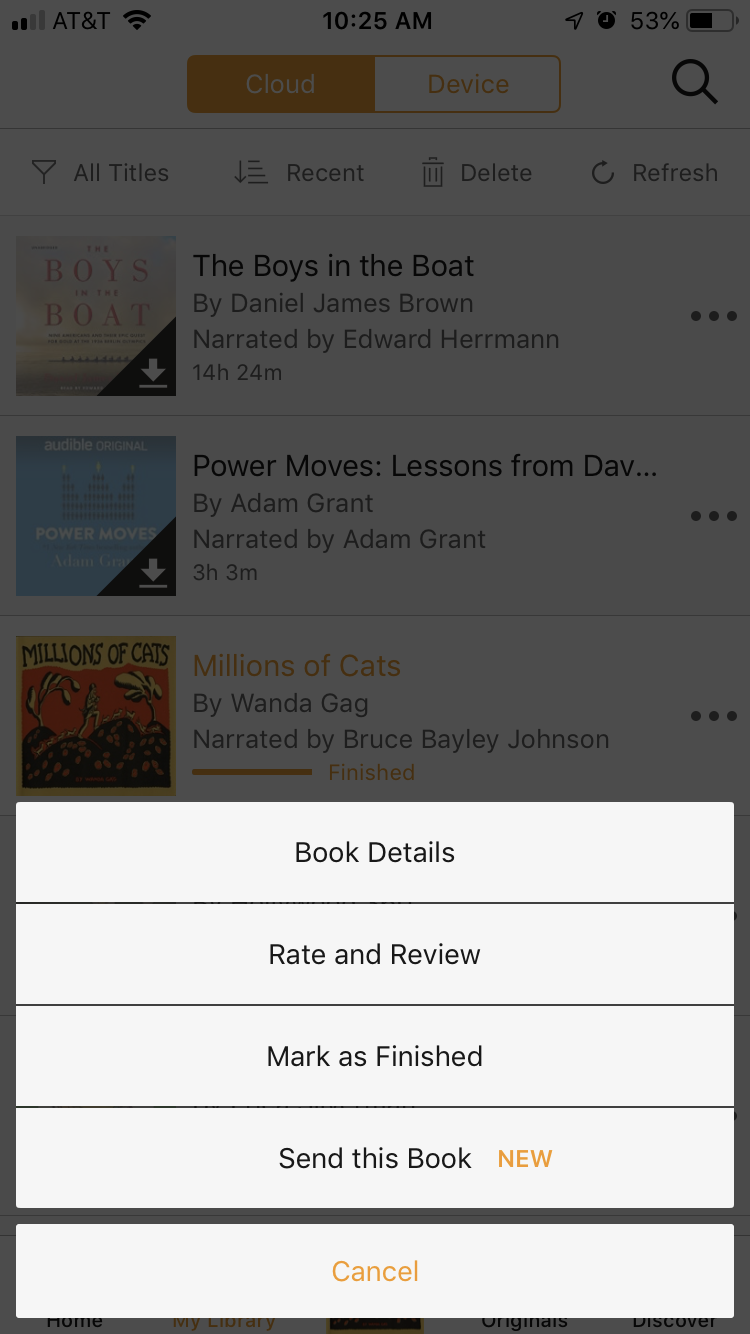
- Recommend with Send this Book
- Use the feature to share a recommendation link.
- The recipient gets a sample and details. They still need a license to listen.
- Share with kids and teens
- Add child or teen profiles in Household.
- Add suitable titles to their Library for supervised listening.
These options help when you ask can you share audible books outside Amazon Household. You cannot transfer your own license. But you can give them their own copy.

Practical scenarios, tips, and my lessons learned
When I first set up Household, I shared travel books with my spouse. The process was quick. The titles appeared in minutes. It answered our own question: can you share audible books without sharing passwords? Yes, and it felt smooth.
Things I learned:
- Start with a small batch of titles to test syncing.
- Use Collections to keep shared books tidy.
- Communicate which titles you add, to avoid confusion.
Mistakes to avoid:
- Do not share your login. It breaks policy and mixes progress data.
- Do not assume all titles share. Always check the title’s status.
- Do not try to share across regions. It often fails.
Pro tip: If you travel a lot, download shared titles to your device before a trip. This prevents region pop-ups. This is extra helpful if you keep asking can you share audible books while abroad.
Troubleshooting and common errors
If a shared title does not show up, try these checks. Most issues are simple. A few relate to region or permissions.
- The title is not enabled for sharing
- Check Manage Your Content and Devices.
- If Add to Family Library is missing, it may be restricted.
- Region or marketplace mismatch
- Household members must use the same country store.
- Move both accounts to the same marketplace if needed.
- Sync or app cache issues
- Refresh the Library or sign out and back in.
- Update the app to the latest version.
- Payment or account status problem
- Confirm the title is owned, not just borrowed from Plus.
- Check that your account is in good standing.
- Household sharing turned off
- Reopen Household settings.
- Confirm both adults still agree to share content.
These checks will resolve most concerns around can you share audible books and why a title is missing. If problems continue, contact support and share your title details.

Frequently Asked Questions of can you share audible books
Can you share Audible books without Amazon Household?
No. You cannot transfer your own license outside Household. Use gifting or membership gifts for anyone not in your Household.
Can you share Audible books with a spouse?
Yes. Create an Amazon Household with your spouse. Turn on Family Library Sharing and add eligible titles.
Can you share Audible books across countries?
Usually no. Marketplace rules limit sharing across regions. Move both accounts to the same country store to enable sharing.
Can you share Audible books with kids?
Yes, through child or teen profiles. Add age‑appropriate titles to their Library for supervised use.
Can you share Audible books and credits together?
You cannot share credits. Use a credit to buy the book, then share that eligible title through Family Library.
How many devices can use the same Audible account?
You can use several devices on one account for personal use. Avoid sharing your login with others to stay within policy.
Conclusion
Sharing on Audible works best through Amazon Household and Family Library. You share access, not files, and you stay within the rules. If you still wonder can you share audible books beyond family, use gifts or a membership. They are simple and fair.
Make your plan today. Set up your Household, test a few titles, and enjoy more listening together. Want more guides like this? Subscribe for updates or leave a question in the comments.